I was tasked with designing a movie Ticket Booking app for the use of booking your favourite movie at local theater. The purpose was not to design fully fiedged app, instead it was to showcase my design thinking process and to take the solution as far as i could in the short timeline.
This section is all about discovering and understanding the user's needs, goals, and pain points. I set myself a few research goals before getting started.
I sent out a user survey using Google Forms and received 80 responses. Here is a summary of the average user’s characteristics:
Limitations and assumptions: Survey respondents were not pre-screened. Availability of seats and showtimes may not update in real-time, leading to potential double bookings or misinformation. A complex interface may deter users, especially those less tech-savvy. The app is designed with the assumption that users are frequent moviegoers who seek convenience and speed. Users will be interested in sharing their movie experiences on social media platforms.
I noticed some common themes and patterns among the survey responses.
Most users did not rely on a single tool to plan and book their favourite movie. They used multiple websites and apps to figure out the best prices, reviews, Movies, etc.
Users spent a lot of time researching and planning their favourite movie to watch in order to get confuse about getting the movie ticket at their favourite of seat.
Here’s what some of the users said when asked about planning and booking movie tickets.
I wish there was an app that had this all included instead of having to go back and forth between platforms.
When ever some great movie released their ticket get selled very quickly and do not get notified.
Sometime i got stuck in some work and want to get the movie ticket insteadly so i need an app which can work remotly everywhere.
The ticket booking process is generally smooth, but incorporating a feature to select preferred seats directly from the seating chart could greatly enhance user experience.

21 yrs old | Navsari, Gujarat | Graphic Designer
At this stage it was time to re-define my goal and narrow down its scope based on the insights I gained from users. Because of the short timeline for this exercise, I chose to focus on a single feature.
The user needs an easy way to get their ticket remotely without wasting and time and standing in queue for ticket and getting their favourite seats.
To address the users pain points I decided to design a Movie Ticket booking app within an existing movie booking app. It would make the app a “one-stop-shop” to plan and book their movie tickets. The planning feature would let users like Anant:
Based on Anant’s goals and needs, the app should:
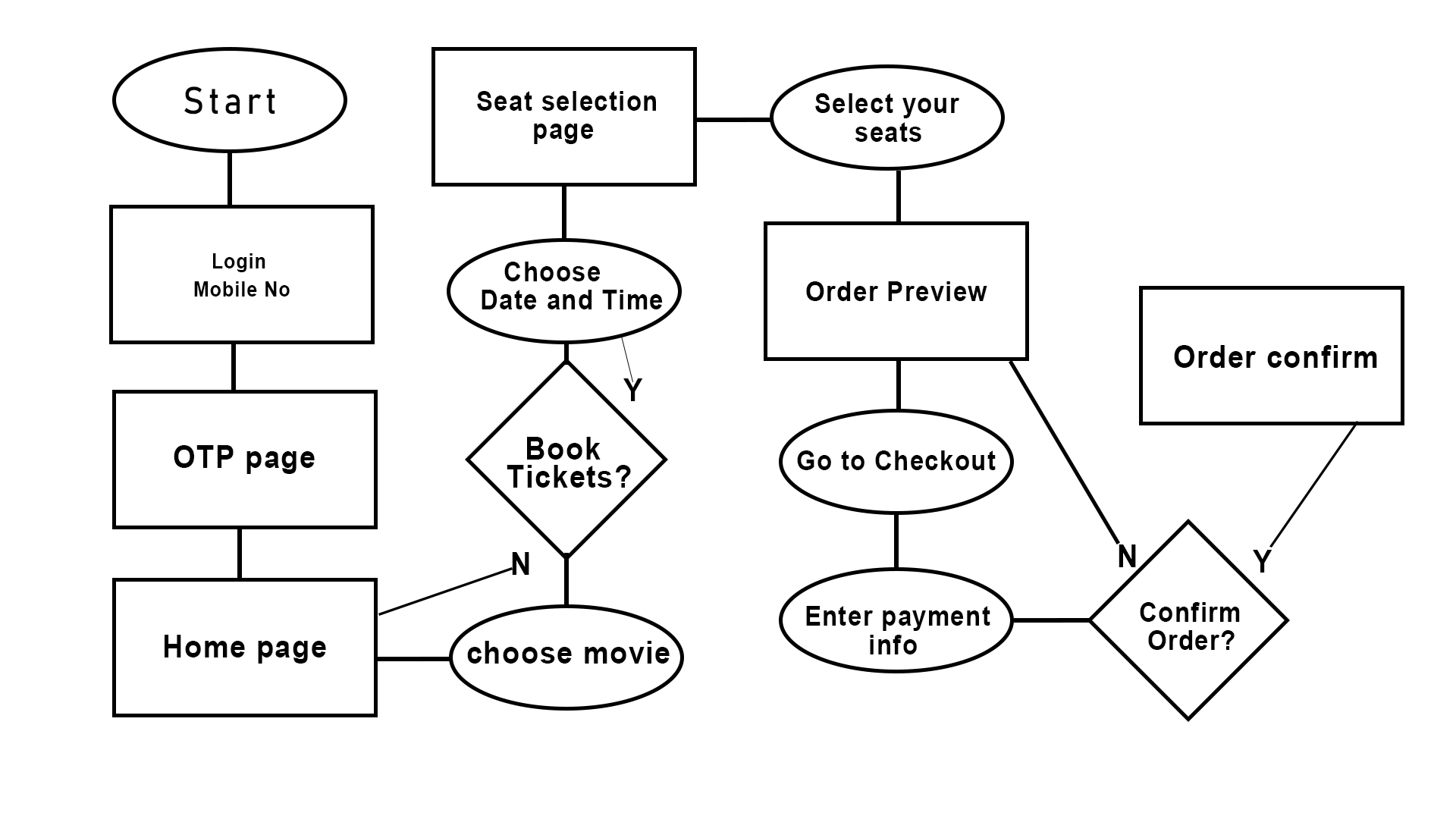
What steps Anant takes before, during and after her involvement with the app.
I started by sketching some user flows and early wireframe ideas.


I wanted to be realistic in what I could achieve given the time limitations, so I decided to focus the solution on 2 aspects of trip planning: discovering a location and browsing accommodations (boxed area).
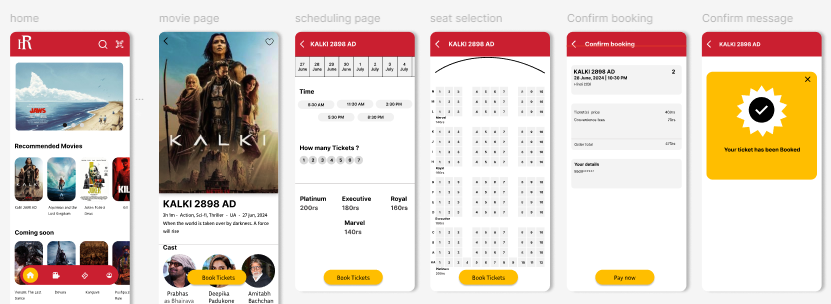
This section demonstrates the designed solution, from low-fidelity wireframes to a high-fidelity prototype. Figma was used as the design tool.
I designed some wireframes that focused on Anant’s goals and would allow her to:

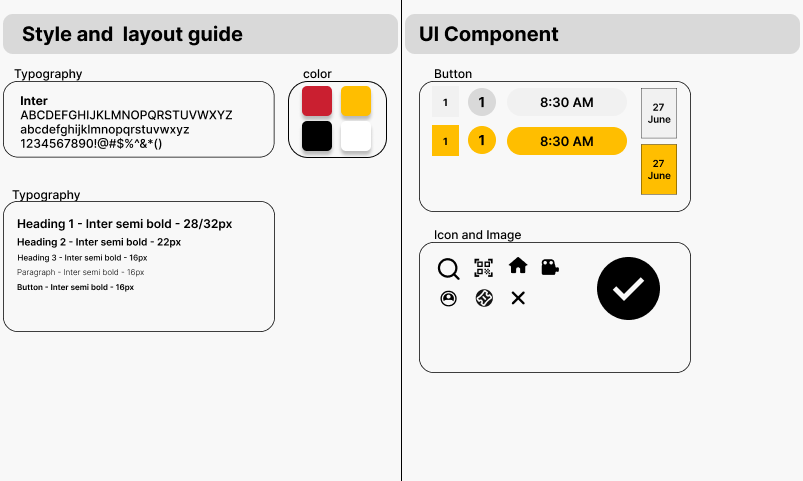
I kept the colors simple and chose a modern, variable sans-serif font that is easy to read on all screens. I kept layouts consistent by using a 4-column, 8px grid. Illustrations (modified but not created by me) add some deslightful touches to a simple UI.
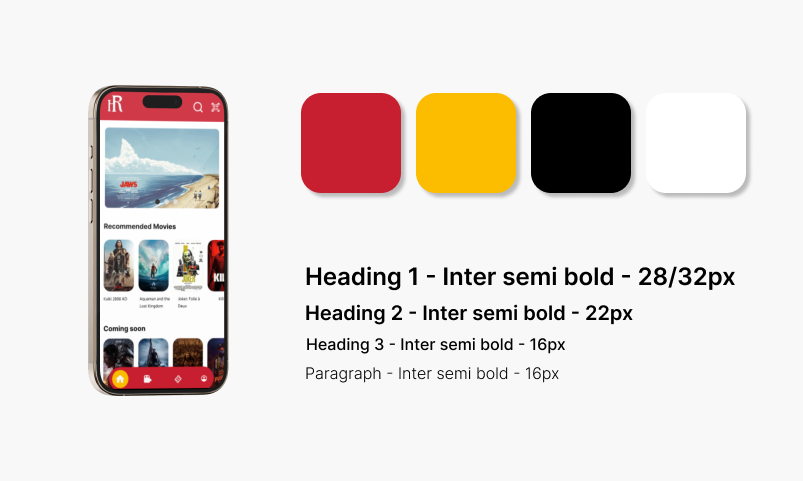
After setting up color and text styles in Figma, I started to build a component library to maintain consistency across the designs. Components were setup using auto layout to make sure they are scalable across different screen sizes.
All of these elements finally come together in the final designs. Users can search by location to create a new trip and start planning.

While carrying out this exercise I had to make assumptions and trade-offs in order to make progress and stick to the timeline. Here are a few of the constraints and trade-offs that I considered: